
WhatsApp interoperability and Balsio: how it works
You can now message someone on WhatsApp without using WhatsApp.
Here's how it works and how to get started.
A new EU rule changed messaging
The EU now requires WhatsApp to work with other messaging apps. Just like you can email from Gmail to Outlook, you can now message from one app to another.
Balsio is one of the first apps to do this. Send a message from Balsio, it arrives in WhatsApp. They reply, it arrives in Balsio. Two apps, one conversation.


How it works
No account linking. Balsio and WhatsApp are separate apps. You don't connect or pair them. Enter a phone number, send a message. It arrives in WhatsApp.
End-to-end encrypted. Messages are end-to-end encrypted to the same standard as WhatsApp.
Phone number based. Balsio uses your work email as your identity, and that’s what WhatsApp users see. The connection itself works through phone numbers, which is how WhatsApp identifies people.
Get started
Two things need to happen.
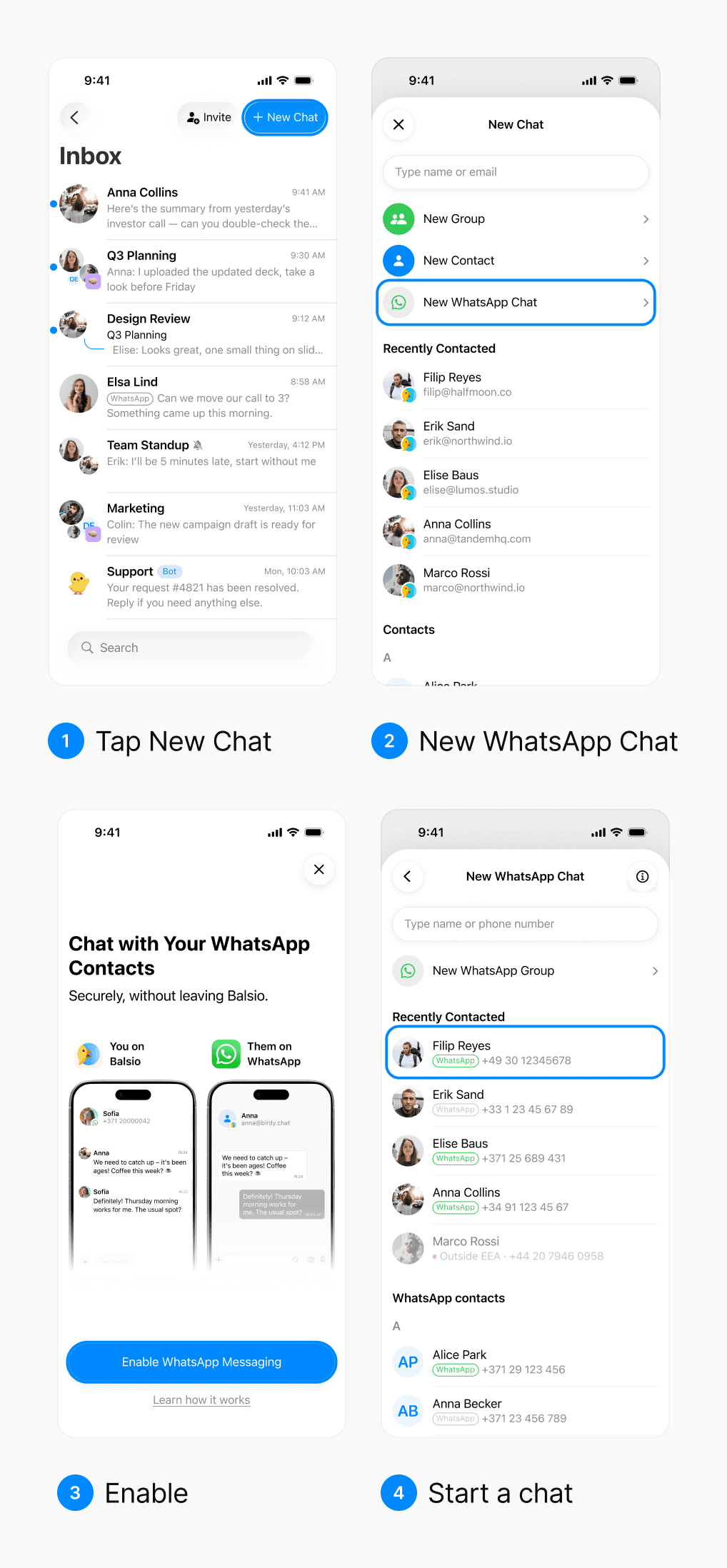
1. Turn on WhatsApp chats in Balsio
Open Balsio, tap New Chat → New WhatsApp Chat, then tap Enable WhatsApp Messaging. You only do this once on each device.

Then pick a WhatsApp contact from your phonebook, or type their number with the country code.

2. Your contact turns on Third-party chats in WhatsApp
On iPhone, they open WhatsApp and tap You → Account → Third-party chats → Turn on, select Balsio and confirm. On Android, it’s ⋮ → Settings → Account → Third-party chats, then the same steps.

Until they turn it on, you can’t message them from Balsio, and the chat shows “Their WhatsApp Is Not Ready Yet”. Tap Send Instructions to send them the steps on WhatsApp. Once they turn it on, the chat unlocks, and if you sent instructions, Balsio adds it to your Inbox by itself.
What works today
You can send text, photos, videos, files, replies and reactions, and receive voice messages. Editing, deleting and Send Later aren’t available in WhatsApp chats.
Calls aren’t supported, and group chats are coming.
Availability
The European Economic Area: 27 EU countries plus Iceland, Liechtenstein, and Norway.
Switzerland and the UK aren't part of the EEA and are not covered.
Frequently asked questions
What does the person on WhatsApp see?
Your work email and your messages. They don’t see your phone number, your Balsio name or your profile photo.
Can a WhatsApp user message me first?
Yes, once you’ve turned on WhatsApp chats in Balsio and they’ve turned on Third-party chats. Their message starts a new chat in your Inbox.
Why can't I message this WhatsApp number?
Make sure the number has its country code (for example, +371). Balsio shows “Missing Country Code” when it doesn’t. WhatsApp chats only work with numbers in the European Economic Area.
Which platforms are supported?
iPhone, iPad and Android. Not on Mac, Windows or the web yet. WhatsApp chats work on one device at a time, and their history stays on that device.
What if my contact doesn't see Third-party chats in WhatsApp?
They should update WhatsApp to the latest version and restart it. The feature is only available in the European Economic Area.
Is it safe?
Yes. Messages are end-to-end encrypted with WhatsApp’s own encryption, even across apps.
Can I turn it off?
Yes. In Balsio, go to Settings → WhatsApp Network → Leave WhatsApp Network. Your WhatsApp contact can also turn off Third-party chats in WhatsApp.
Want to try Balsio?
A modern work chat that now connects with WhatsApp.